Meta Description: Remote desk life comfort hacks can change the long hours you spend working — here are 8 proven ways to enhance alertness, decrease fatigue, and work pain-free every day!
8 Tested Comfort Hacks for Remote Desk Life During Long Working Hours
Making those two elements work together can seem like a dream. No travel time, no office chatter, no dress code. But after months of spending 8, 9, or even 10 hours a day sitting at your desk, your body starts sending red flags. Your back aches. Your eyes burn. Your neck feels like concrete. Your brain just stops.
The reality is, remote work can gradually ruin your physical comfort if you never do it right. But here’s the good news — a few small, smart changes to your workspace go a long way. You don’t need a fancy office, and you don’t need a big budget. You just need some remote desk life comfort hacks.
This guide compiles 8 of the most practical, research-backed tips that real-life remote workers use to stay comfortable and focused when working from home for hours on end. Whether you work freelance, full-time remote, or as a student crushing some extended study shifts, these tips are for you.
For more tips, tools, and guides built around working better from home, visit Remote Desk Life — a resource dedicated to helping remote workers thrive.
1. Make Your Chair Work For You Instead of Against You
Your chair is your home office’s most vital piece of real estate. But most people either sit on a dining room chair, a bar stool, or whatever else they had lying around. And that’s one of the quickest routes to chronic back pain.
What Defines a Chair as Truly Ergonomic?
An ergonomic chair cradles the natural curve of your spine. It maintains your hips at a 90-degree angle or a slight recline. You should have your feet flat on the floor. Your lumbar region — your lower back — should feel supported, not empty.
Here are the most important adjustments to make right now:
| Chair Setting | Correct Position |
|---|---|
| Seat height | Feet flat on the floor, knees at 90° |
| Lumbar support | Pressed against the curve of your lower back |
| Armrests | Elbows at 90°, shoulders relaxed |
| Seat depth | 2–4 inches of space between seat edge and back of knees |
| Backrest angle | 100–110° recline to reduce spinal pressure |
You don’t have to drop a grand on a Herman Miller chair. Even a $100–$200 ergonomic chair with adjustable lower back support is an improvement over most stylish-but-flat chairs available to consumers.
If you’re stuck with what you have, consider a rolled-up towel or small cushion placed at the curve of your lower back. It’s a low-cost remote desk life comfort hack that costs almost nothing.
2. Raise Your Monitor Before Your Back Pays the Price
Neck pain from working remotely is incredibly common. The reason? Most people look slightly downward at their screens all day. This position stores a large amount of tension in your neck, particularly in the cervical spine.
The Eye-Level Rule
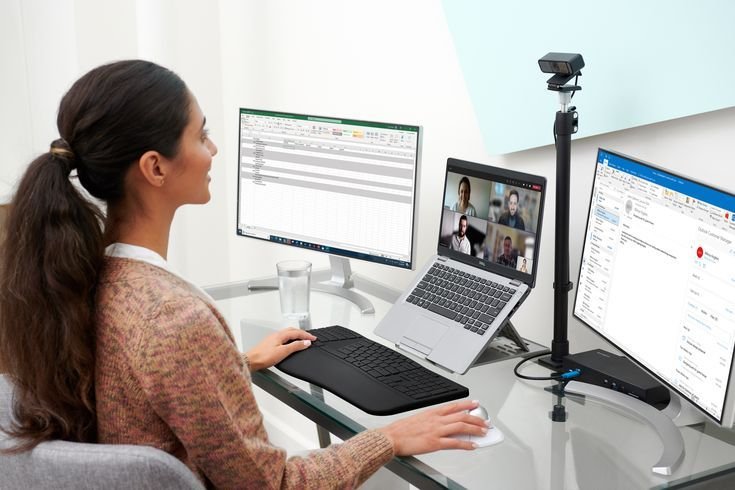
The top edge of your monitor should rest at or just below eye level. The screen distance should be roughly an arm’s length away — around 20 to 28 inches from your face. Angle the monitor backward 10 to 20 degrees to minimize glare and align with your natural downward gaze.
This gets trickier if you are using a laptop. Laptop screens are almost always too low. The solution is easy and inexpensive: invest in a laptop stand or stack your laptop on two or three thick books, then plug in an external keyboard and mouse. This one adjustment can erase most neck and upper shoulder tension in just a few days.
For those with multiple monitors, keep the primary screen centered. If you are dividing your time evenly between two screens, position the screens symmetrically on either side. Twisting your neck to one side for hours at a time is just as damaging as staring downward.
3. Fix Your Lighting Before Your Eyes Make You Pay
One of the most underrated remote desk life comfort issues is poor lighting. Work in dim light, and you strain to see. Add in harsh overhead lighting or a bright window directly behind your screen, and you get glare and headaches.
Layers of Good Lighting
The best home office lighting uses multiple sources instead of one bright overhead bulb.
Natural light is your best friend — as long as it’s coming in from the side, not from behind or in front of your screen. Position your desk perpendicular to any windows so daylight washes across your workspace without hitting the screen directly.
Ambient lighting casts a soft, even light throughout the room. For long sessions, a warm or neutral-toned LED bulb (around 4,000K color temperature) works well.
Task lighting directs light precisely where you need it most — on your keyboard, your notepad, your documents. An adjustable desk lamp does this well and doesn’t have to be expensive.
Bias lighting is a lesser-known hack. Place a soft LED strip behind your monitor. That reduces the contrast between your bright screen and the darker surrounding wall, which makes a noticeable difference in eye fatigue over longer sessions. Bias lighting kits can be found for less than $20.
In the afternoon, also turn on the blue light filter or night mode for your device. Blue light from screens interferes with your melatonin levels, disrupting sleep — and poor sleep is the enemy of every remote worker’s productivity.
4. The Power of Micro-Breaks (Your Body Craves Them)
Here’s something that surprises people: sitting completely still for long hours is not productive. It may feel like you’re focused, but your body is gradually tensing up, your circulation is slowing, and your brain is quietly burning out.
The 45–60 Minute Rule
Studies have shown time and again that taking a short break every 45 to 60 minutes improves focus, decreases physical tension, and increases overall output. These don’t have to be long breaks — even 5 minutes of movement is enough.
The 20-20-20 rule is one of the best micro-break hacks specifically for eye health. Every 20 minutes, glance at something 20 feet away for 20 seconds. This relaxes the muscles inside your eye that have been focusing up close.
According to the American Optometric Association, following the 20-20-20 rule is one of the most effective ways to reduce digital eye strain during prolonged screen use.
Try this quick micro-break routine in under 5 minutes:
- Stand up and roll your shoulders backward 5 times
- Stare out of a window or at a wall in the distance for 20 seconds
- Do 10 slow neck rotations
- Walk to the kitchen for a glass of water
- Sit back down after taking 3 deep breaths
Use a phone timer or a free app like Stretchly to remind you. Most people report that once they start doing this, they feel more focused in their next work block — not less.
5. A Clear Desk Means a Clear Mind
There’s real science behind why a messy desk makes you less productive. Visual clutter competes for your attention. Each object your eyes land on that isn’t related to your current task costs a small amount of mental energy. Over 8 hours, that adds up.
The 5-Item Desk Rule
Try limiting what you keep on your desk to five categories of items at a time: your computer, a notebook, a pen, your current drink, and one personal item (like a plant or a small framed photo). Everything else goes in a drawer, on a shelf, or out of the room entirely.
Cable management is another quick win. A tangled heap of charging cables and cords creates visual noise and gets in the way physically. Cable clips, velcro ties, or even binder clips on the edge of your desk keep everything neat for less than $10.
| What to Keep on Your Desk | What to Remove |
|---|---|
| Your computer or monitor | Old papers and mail |
| Notebook + one pen | Unused chargers |
| Water bottle | Food wrappers |
| One personal item | Books not currently in use |
| Current task materials | Extra tech accessories |
A weekly 5-minute desk reset — every Friday afternoon before you close up — prevents things from building back up. Think of it as part of your end-of-week routine.
6. Hydration Is Not Optional — Set Up a Water Station
Many remote workers are chronically dehydrated without knowing it. When you’re deeply in the zone, it’s easy to forget to drink anything for 3 or 4 hours. Mild dehydration causes headaches, brain fog, and fatigue — symptoms that people often blame on overwork when water would fix them.
The Desk Water Station Hack
Keep a large water bottle — 32 oz or more — directly on your desk within arm’s reach. Not in the kitchen. Not across the room. On your desk. Proximity is the key. When it’s right there, you sip without thinking about it.
Some people prefer a small insulated carafe that keeps water cold or warm for hours without needing to be refilled constantly.
A loose target: finish one full 32 oz bottle by lunchtime, and another by the end of work. That’s roughly 2 liters — the basic daily minimum for most adults in a sedentary office environment.
Also keep at least one healthy snack within reach — a small bowl of nuts, some fruit, or crackers. Long work sessions combined with poor nutrition are a focus-killer. You’re not just nourishing your body, you’re nourishing your brain.
7. Manage Noise Like a Pro
Noise is one of the biggest comfort disruptors for remote workers. Traffic outside, family members at home, neighbors, background music from a café — all of it competes for your attention, raises your stress levels, and drains your focus faster than you might expect.
Headphones vs. White Noise — Which Is Better?
Both approaches can work, and many people combine the two. Here’s a quick breakdown:
| Noise Solution | Best For | Cost Range |
|---|---|---|
| Over-ear noise-canceling headphones | Deep focus work, calls | $80–$350 |
| In-ear earbuds with ANC | Portability, casual use | $30–$200 |
| White noise machine | Background ambient noise | $20–$60 |
| White noise app (free) | Budget option | Free |
| Acoustic foam panels | Reducing echo in room | $25–$80 |
| Door draft stopper | Muffling hallway noise | $10–$20 |
White noise works by masking irregular background sounds with a constant, neutral sound your brain quickly learns to tune out. Studies show it can meaningfully improve concentration in noisy environments.
For creative or analytical work, many remote workers swear by lo-fi music, nature sounds, or brown noise. A simple noise-canceling microphone removes background sound from calls and video meetings before it ever reaches your colleagues.
8. Room Temperature — The Stealthy Productivity Killer
You would be amazed how much temperature affects your ability to work. A very hot room makes you drowsy and sluggish. A very cold room causes your muscles to tense, your shoulders to round, and your concentration to narrow.
The Ideal Working Temperature Range
Research from organizations including the Cornell Human Factors and Ergonomics Research Group indicates that cognitive performance and comfort peak at around 68°F to 72°F (20°C to 22°C).
During hotter months, run a small desk fan to keep the air circulating even if your room has air-conditioning. Moving air feels cooler and also helps keep you alert.
During colder months, a small electric space heater next to your desk keeps your extremities warm without blasting the whole house’s heating system. Cold hands on a keyboard are uncomfortable — they also slow your typing and increase muscle tension.
Wear layers when working from home. It’s one of those underrated remote desk life comfort hacks that people forget about because it seems too simple. A light cardigan or hoodie draped over your chair costs nothing and lets you adapt instantly to temperature changes throughout the day.
Building Your Personal Remote Desk Comfort Routine
These 8 remote desk life comfort hacks work best when they become habits rather than one-time adjustments. Here’s a straightforward daily framework for weaving them in:
Morning setup (5 minutes): Adjust your chair, check your monitor height, fill your water bottle, and clear anything that doesn’t belong on the desk from yesterday.
Every hour: Complete your 5-minute micro-break. Stand, stretch, look away from the screen, drink water.
Afternoon check-in: Is your room temperature still comfortable? Are your headphones charged if you need them for afternoon focus blocks?
End-of-day reset (5 minutes): Clear your desk back to the 5-item rule. Close tabs. Tuck cables. This signals to your brain that the work day is over.
Stacking these habits on top of each other doesn’t take more time — it saves time by keeping your body and mind in better working condition throughout the day.
Frequently Asked Questions
Q: Do I have to buy expensive equipment to make my home office comfortable? Not at all. Some of the best remote desk life comfort hacks on this list cost nothing — micro-breaks, hydration, and temperature layering require zero gear. Even monitor height can be fixed with a stack of books.
Q: When will I start seeing a difference from all of this? Many people find that within a few days of adjusting their monitor height and chair, they notice reduced neck tension and eye fatigue. The benefits of hydration appear even sooner — within a single work session.
Q: Is being sedentary at a desk all day really that dangerous? Yes. Extended sitting is associated with higher risk for back pain, cardiovascular issues, and reduced mental focus. But the damage isn’t from sitting itself — it’s from sitting poorly and not taking breaks. Good ergonomics and regular movement greatly reduce those risks.
Q: What should I do if I have no control over the noise around me? Noise-canceling headphones can be the single best thing you buy if your home is noisy. Even budget options under $50 block a significant amount of ambient sound. If headphones aren’t an option, a free white-noise app on your phone can also help.
Q: How often should I take breaks during an 8-hour workday? A good guideline is a 5-minute break for every 45–60 minutes of focused work, plus a longer 15–20 minute break mid-morning and mid-afternoon. This parallels the Pomodoro Technique and fits with natural attention cycles.
Q: Does a cluttered desk really have an impact on productivity? Research in environmental psychology consistently shows that cluttered environments increase stress hormones and shorten attention spans. A clear desk isn’t about perfectionism — it’s about removing competition for your attention.
Q: If I can only do one thing today, what is the best quick fix? Set up micro-breaks. It’s free, takes 30 seconds to schedule on your phone, and leads to immediate, noticeable gains in energy and concentration throughout the day. It’s the simplest of all remote desk life comfort hacks.
Q: Do plants or personal mementos on my desk actually help? Yes. Research from the University of Exeter found that workers in plant-filled offices were 15% more productive. A small plant also gives a slight boost to air quality and offers a natural visual break from screen glare.
Takeaway: Small Changes, Big Comfort
For millions of people, remote work is permanent. But desk comfort doesn’t happen automatically — it requires purposeful setup. The 8 remote desk life comfort hacks in this guide are not complicated. They don’t require a renovation or a big budget. They require attention and a genuine commitment to treating your physical environment with care.
Start with just two or three. Adjust your chair. Raise your monitor. Set a break timer. Then add more over the next few weeks. Each small change builds on the previous one, and together they create a workspace that works with your body rather than against it.
Your desk should be a place where you do your best work — not a place where your back, neck, eyes, and brain quietly pay the price.