I still remember the afternoon I lost an entire hour looking for a sticky note with a client’s login credentials on it. My desk looked like a paper hurricane had touched down — cables everywhere, three half-empty coffee mugs, a mouse buried under a pile of notebooks, and somewhere in there, my actual work. That was the day I decided enough was enough.
If your home desk feels more like a stress machine than a productivity zone, you’re not alone. Most remote workers — myself included — spend way too long figuring out what to organize instead of just doing it. So I tested a bunch of things over a few months, kept what actually worked, and ditched what was just pretty-looking fluff.
Here are the 9 hacks that genuinely changed how I work. Not Pinterest-board fantasies — real stuff.
1. The “One Surface Rule” Changed Everything For Me
This sounds almost too simple, but hear me out. I used to have stuff spread across my desk, a side table, a chair, and occasionally the floor. The moment I forced myself to keep everything within one flat surface — just the desk itself — my brain stopped scanning for things and started actually focusing.
The rule is straightforward: if it doesn’t live on the desk, it doesn’t get to visit the desk during work hours. Water bottle? Fine. Stack of bills from three weeks ago? Gone.
This single constraint forced me to make decisions about what actually needs to be there. Most stuff doesn’t.
How to try it today:
- Clear your entire desk surface completely
- Only put back what you actively use daily
- Everything else goes into a drawer, shelf, or box — even temporarily
You’ll feel the difference within 20 minutes of sitting down to work.
2. Zone Your Desk Like a Kitchen Counter
Professional chefs don’t randomly place things on their stations — everything has a zone. Hot prep here, plating there, tools within arm’s reach. I borrowed this idea for my desk and it’s probably the most underrated organization tip I’ve ever applied.
I split my desk into three zones:
| Zone | What Goes Here |
|---|---|
| Primary Zone (directly in front) | Monitor, keyboard, mouse — your active work area |
| Secondary Zone (arm’s reach left/right) | Notebook, pen, water bottle, phone |
| Storage Zone (desk edges/back) | Cable chargers, headphones when not in use, small organizer tray |
Anything outside these zones is clutter. Period.
Once you label these zones mentally (you don’t have to tape them out, but I actually did at first), your hands start going to the right place automatically. You stop hunting. You stop micro-pausing. Your focus stays where it belongs.

3. Vertical Space is Free Real Estate You’re Ignoring
Most people only think in two dimensions when organizing a desk. Big mistake. The wall above your desk and the space between your monitor and the wall is basically prime real estate you’re leaving empty.
I added a floating shelf about 14 inches above my desk surface. It now holds my router, a small succulent (genuinely helps — I don’t know why), and a few reference books I occasionally flip through. That freed up roughly 40% of my desk surface instantly without buying anything major.
Other vertical options that work really well:
- Monitor riser with storage underneath — I use one from Amazon Basics; it’s cheap and sturdy
- Pegboard on the wall — great for cables, headphones, small accessories
- Over-monitor shelf — holds speakers, a small lamp, or rarely-used items
If you’re in a small apartment like I was when I started working remotely, vertical organization isn’t optional — it’s survival.
4. Cable Management Isn’t Just Aesthetic — It Actually Reduces Mental Load
I used to laugh at people who obsessed over cable management. Then I read something about cognitive load — basically, visual chaos forces your brain to constantly process irrelevant information in the background. A nest of cables is your brain’s enemy, even if you think you’ve “gotten used to it.”
Fixing my cables took about 45 minutes and cost me around $12 in velcro cable ties and a couple of cable clips from a local electronics shop.
My exact process:
- Unplug everything
- Group cables by destination (monitor cables together, charging cables together)
- Use velcro ties (not zip ties — you’ll want to adjust later) to bundle groups
- Clip bundles along the desk edge or route them through a cable box underneath
- Label the ends of cables with small sticker tags so you’re never guessing
The result? My desk looks cleaner, sure — but more importantly, I stopped getting that low-key annoyed feeling every time I glanced at the cable side of my setup.
If you want a deeper dive on this, 6 Proven Remote Desk Life Cable Management Tricks That Look Clean is worth reading through.
5. The “Capture Box” System — Steal This Immediately
Here’s a habit I picked up from reading about GTD (Getting Things Done) methodology, adapted for physical desks. The idea is to have one single designated spot — I call it the Capture Box — where everything lands that needs attention later.
Random receipts, sticky notes, that business card you scribbled something on, the charger your colleague left — it all goes in the box first.
Once a day (I do it right before I close my laptop), I process the box. That means:
- Trash what’s useless
- Act immediately on anything that takes less than 2 minutes
- File or schedule everything else
Before this system, important things got lost in the general clutter. After it, I always know where to look first.
I use a simple wooden tray from IKEA — nothing fancy. Any container with clear edges works.
6. Your Drawer Organization Probably Needs a Complete Rebuild
Open your desk drawer right now. I’ll wait.
If it looks anything like mine used to — a graveyard of dead pens, random USB drives, rubber bands, and mystery adapters — then your “organized” desk is actually hiding chaos.
The problem with messy drawers is that you subconsciously know they’re there. It creates a mental tax every time you open one.
I spent one Sunday afternoon completely rebuilding my drawer system using this approach:
The Three-Drawer Method (if you have them):
| Drawer | Contents |
|---|---|
| Top drawer | Daily use items: pens, sticky notes, earphones, small tools |
| Middle drawer | Weekly use items: chargers, cables, small accessories |
| Bottom drawer | Monthly use or archive: documents, manuals, backup items |
Inside each drawer, use small dividers or repurposed boxes (I literally used cut-up cardboard boxes) to create sections. This alone took my drawer-opening time from “10-second search” to “2-second grab.”
7. A Dedicated “End of Day” Reset Routine Is the Real Hack
This one sounds like a soft life skill, but it’s actually the backbone of every other organization system on this list. Because here’s the truth: no organization hack survives contact with a busy work week without a reset ritual.
My end-of-day routine takes exactly 7 minutes:
- Clear the desk surface — everything goes back to its zone
- Process the Capture Box — trash, act, or file
- Coil and store any cables that came out during the day
- Write tomorrow’s top 3 tasks on a sticky note and place it center-desk
- Wipe the desk surface with a microfiber cloth (takes 30 seconds, feels great)
That sticky note with tomorrow’s tasks? Game changer. I found that my mornings went from “okay, what am I doing today?” to immediately sitting down and starting. That transition time is where focus leaks.
For more morning-to-workday flow ideas, check out 5 Powerful Remote Desk Life Morning Routines That Changed My Workday.
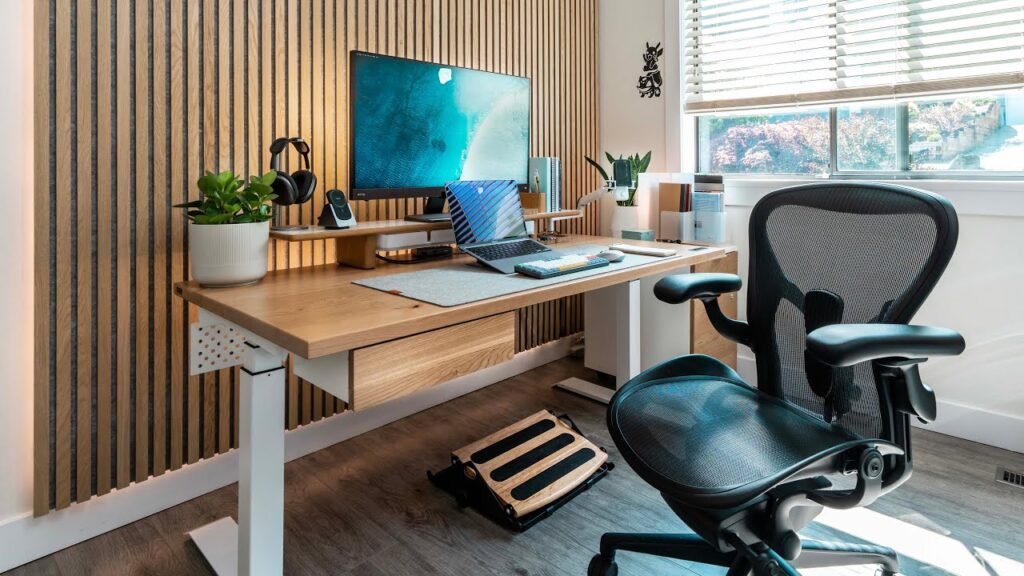
8. The “Only What’s In Use” Tool Rule
This is a mindset shift more than a physical hack, but it has physical consequences. The rule is: tools that aren’t currently in use don’t get to sit on your desk.
That means:
- Headphones go on a hook (I use a simple under-desk adhesive hook) when not in my ears
- Extra monitors get turned off and their cables coiled when I’m in a single-screen mode
- Notebooks get closed and stacked when I’m in deep writing mode
- Physical inbox tray gets cleared at the end of every day
I know this sounds almost obsessive, but there’s a reason it works. Every object on your desk is a potential focus-thief. Your eye lands on it, your brain briefly processes it (“should I respond to that? what was that for?”), and you’ve lost 3 seconds of attention. Do that 50 times a day and you’ve lost meaningful chunks of deep work time.
The fewer objects in your visual field, the faster your brain locks into what’s in front of it.
9. Lighting Placement Is an Underrated Focus Tool
I used to have a cheap overhead light and thought that was fine. Then I moved my desk setup around and accidentally placed a warm desk lamp to my left — and my focus improved noticeably. I didn’t connect the dots for two weeks.
Turns out, how light hits your workspace affects eye strain, mood, and even alertness. Here’s what I’ve learned through trial and error:
Lighting setup that actually works:
| Light Source | Placement | Effect |
|---|---|---|
| Main desk lamp | Left side (if right-handed) | Reduces shadows on work area |
| Bias lighting (behind monitor) | Behind your screen | Reduces eye strain significantly |
| Natural light | Side of desk, not directly in front or back | Avoids glare and squinting |
Bias lighting — a simple LED strip behind your monitor — was the single biggest change I didn’t expect to matter. My eyes feel dramatically less tired after a long work session. I use a cheap Govee LED strip that I got for under $15. Absolutely worth it.
Also, avoid working directly facing a bright window or with a window directly behind your monitor. Both cause glare and squinting that compounds fatigue over hours.
For a complete look at workspace setup that protects your body over long workdays, this guide on 11 Powerful Remote Desk Life Ergonomic Essentials for Remote Workers goes deep on what actually matters.
Common Mistakes I Made (So You Don’t Have To)
Before I wrap up, let me be honest about the things I got wrong initially:
Over-buying organization products — I spent probably $80 on desk organizers I never used because I bought them before figuring out what I actually needed. Always audit first, buy second.
Organizing for looks, not workflow — I had a beautifully organized desk once that was terrible to actually work at because I arranged things aesthetically instead of functionally. Your workflow trumps aesthetics, always.
Organizing once and never maintaining — Organization without a reset routine collapses within a week. The system matters less than the habit of maintaining it.
Ignoring what was under the desk — Cables, power strips, bags, and random boxes under the desk create visual noise even when you can’t see them directly. Clean underneath too.
One More Thing Worth Knowing
If you’re just getting started with building a proper remote workspace and feel overwhelmed by all the variables — setup, ergonomics, tools, habits — start small. Pick one hack from this list and apply it today. Not all nine. Just one.
The desk organization stuff works in layers. You fix the surface, then you fix the drawers, then the cables, then the lighting — and somewhere along the way, you realize you’ve built a workspace that genuinely supports the way your brain works instead of fighting it.
That’s when remote work stops feeling like you’re wrestling your environment and starts feeling like you’re actually in control.
Also worth reading: If you’re finding that a messy desk is just one part of a bigger productivity problem, 9 Essential Remote Desk Life Productivity Habits I Learned in 30 Days covers the habit side of the equation in a way that pairs really well with everything above.