Okay, real talk — about two years into working from home, my back was wrecked, my eyes felt like sandpaper by 3 PM, and I was genuinely confused why I felt more exhausted than when I used to commute to an office. I had the laptop, the desk, the chair (a cheap one, but still a chair). What was I missing?
Turns out, a lot.
Comfort in a home office isn’t just about having a soft chair or a nice candle on your desk. It’s about dozens of small decisions that either quietly drain you or quietly support you throughout the day. And once I started actually paying attention — testing things, throwing money at some experiments, going cheap on others — my workdays changed dramatically.
These aren’t tips I read somewhere and passed along. These are the seven things I genuinely do every single day, in my actual setup, that make an 8-hour (sometimes 10-hour) workday feel sustainable instead of brutal.
1. I Stopped “Sitting Through” Discomfort and Set a Posture Timer
Here’s the mistake I made for the longest time: I’d feel that dull ache in my lower back around 2 PM, mentally note it, and then just… keep working. Because deadlines. Because meetings. Because inertia.
The fix wasn’t a $900 ergonomic chair (though I’ll get to that). It was a dead-simple timer.
I use a free app called Stretchly on my Mac. Every 20 minutes, it gently interrupts my screen with a micro-break prompt — 20 seconds to look away, shift position, roll my shoulders. Every hour, it pushes a longer 5-minute break. At first I dismissed it constantly. Then I started actually listening to it.
Within two weeks, the 2 PM back ache disappeared.
The science behind this is pretty straightforward — your spinal discs need movement to stay hydrated and healthy. Staying locked in one position, even a “correct” one, cuts off that circulation. Movement is the medicine.
What I do: Set Stretchly or even just a phone timer for every 25 minutes. When it goes off, I stand, shake out my hands, and take three deep breaths before sitting back down. Sounds almost offensively simple, but it works.
2. My Monitor Height Was Wrong for Three Years (Here’s How I Fixed It)
I used to prop my laptop up on books. Not a stack — just one book, maybe two inches of lift. Felt fine. Looked fine. Was absolutely not fine.
The rule that actually helped me: the top of your screen should be at or just slightly below eye level. When your screen is too low, your neck bends forward — and for every inch your head tilts forward, the effective weight on your spine roughly doubles. So a 10-pound head tilted just 3 inches forward puts something like 40 pounds of pressure on your cervical spine. All day. Every day.
I bought a Nexstand K2 laptop stand for about $35. Paired it with a separate wireless keyboard (Logitech K380 — $40, and I’ve used it for three years without issues). That combination alone probably saved me from a physiotherapy bill.
If you’re on a desktop monitor, grab a monitor arm. I use the Ergotron LX and it’s one of the best purchases I’ve made for my workspace. You can dial in the exact height and distance in seconds, and pull it closer or push it back depending on whether you’re reading dense text or watching a presentation.
The adjustment takes ten minutes. The relief lasts indefinitely.
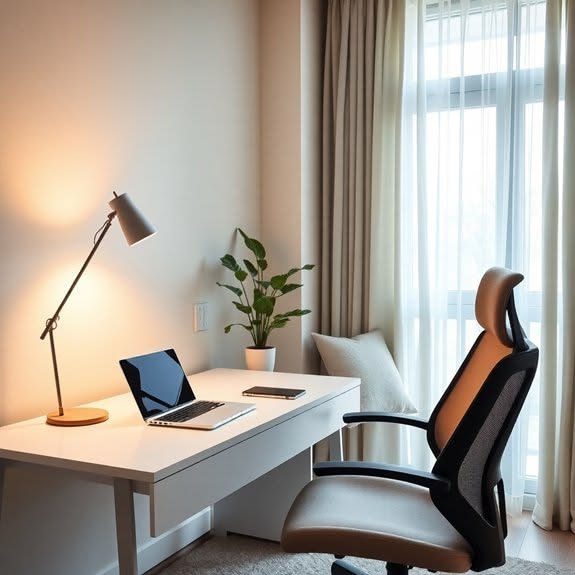
3. 1. The Lighting Setup That Stopped My Headaches
I had a ceiling light and a window. I thought that was enough.
It wasn’t. The window was directly to my side, which meant I was constantly getting a harsh glare on my screen during morning hours. The ceiling light was bright and positioned behind me, creating reflections. By noon, I had the beginnings of a headache almost every day. I blamed dehydration, stress, screen time, everything except the actual culprit: bad lighting.
Good workspace lighting has a few rules I’ve since internalized:
- No light source directly behind your screen or facing you head-on
- Ambient light should roughly match your screen brightness — massive contrasts between a bright screen and a dark room cause eyestrain
- Natural light is best, but from the side — never directly in front or behind
What I added: a BenQ ScreenBar (a monitor-mounted light bar that spreads light across your desk without hitting the screen). Paired with a Philips Hue bulb in a lamp to my left, tuned to a warm 3000K during evenings. The headaches are gone. Completely.
Also, I started using f.lux on my computer — it gradually shifts your screen’s color temperature warmer as the evening progresses. Not just for sleep; it also reduces the harshness of long sessions considerably.
If you’re building out your workspace from scratch or refining it, these 11 powerful remote desk life ergonomic essentials for remote workers cover a lot of the foundational stuff I wish I’d known earlier.
4. I Built a “Fake Commute” and It Changed My Mental State
This one sounds like the softest tip on the list. It’s actually one of the most practically impactful.
When you work from home, the transition between “home mode” and “work mode” is absent. You roll out of bed, shuffle to the desk in pajamas, open the laptop — and your brain is still in rest mode while your calendar says you have a 9 AM call. That cognitive whiplash builds up over weeks into this low-grade fog where you’re never fully off and never fully on.
My fake commute: every morning, I put on proper clothes (not a suit, just real clothes — jeans, a shirt), make coffee with intention rather than desperation, and take a 10-minute walk around the block before sitting down. When I get back, I sit at my desk. Work starts.
In the evening, I have a shutdown ritual: I close all browser tabs, write three tasks for tomorrow in a paper notebook, and take another short walk. Then work is done.
It sounds ceremonial because it is. Rituals signal transitions to your brain. Without them, remote work becomes this amorphous blob that seeps into every hour of your day.
The walk also helps my eyes (distance focus after hours of close screen work) and my posture (movement is everything).
5. My Desk Chair Situation — What I Tried and What Actually Worked
I’ll be honest: I spent $1,200 on a Herman Miller Aeron thinking it would solve all my problems. It helped, significantly, but not as much as the $1,200 price tag implied it should.
The real insight was that no chair is magic if you don’t set it up correctly. I had the Aeron for four months before I actually watched a YouTube video on how to properly adjust lumbar support, seat pan depth, and armrest height. After those adjustments, it became a different chair entirely.
Here’s what I check daily on my chair:
| Setting | What to look for |
|---|---|
| Seat height | Feet flat on floor, thighs roughly parallel to ground |
| Lumbar support | Should sit in the natural curve of your lower back |
| Armrest height | Arms rest naturally, shoulders not shrugging |
| Seat depth | 2–4 fingers between seat edge and back of knees |
| Recline | Slight recline (100–110°) is better than perfectly upright |
If a Herman Miller isn’t in your budget (I get it, I agonized over it too), the Sihoo M18 and Flexispot C7 both give you solid ergonomic adjustability for under $350. The brand matters less than getting the adjustments right.
A few months after getting my chair setup dialed in, I also started using a footrest — a simple slanted foam one from Amazon for $30. Game-changer for anyone with shorter legs, because maintaining proper seat height often means your feet don’t quite reach the floor comfortably.
6. Temperature and Air Quality (The Things Nobody Talks About)
I had no idea how much my workspace temperature was affecting my focus and comfort until I started paying attention to it.
Research consistently shows that cognitive performance tends to peak when ambient temperature is somewhere between 70–77°F (21–25°C). Too cold and your body spends energy staying warm instead of thinking. Too warm and you get sluggish, unfocused, and oddly irritable.
In my home office, I keep a small Dyson Hot+Cool fan — it sounds extravagant but I bought a refurbished one and it’s done double duty as a heater in winter and a fan in summer. The steady white noise it produces is also a bonus.
More importantly: air quality. I have a small Levoit Core 300 air purifier running near my desk. Before I got it, I didn’t think I had an air quality issue — my apartment seemed fine. But I’d often get this dull early-afternoon fatigue that I kept blaming on lunch or screen time.
Turns out, CO₂ levels in a closed room rise surprisingly fast when one person is working in it for hours. Even moderately elevated CO₂ impairs cognitive function. The air purifier and cracking a window for 10–15 minutes every couple of hours made a real difference.
I know this sounds like overkill. Track your afternoon energy for one week without changes, then open a window more deliberately for a week, and see if you notice anything. I’d bet you will.
For more practical ways to optimize your workspace, check out these 6 proven remote desk life focus habits I wish I knew earlier — several of these overlap with the environment side of focus, not just the productivity tactics.
7. Noise Management: The One Change That Doubled My Deep Work Hours
My apartment has a busy road outside, neighbors who apparently enjoy drilling things at random hours, and a shared hallway where conversations echo beautifully. For the first year of remote work, I just… suffered through it.
Then I got Sony WH-1000XM5 headphones and discovered what silence actually felt like during a workday.
I don’t listen to music constantly — sometimes I do, but a lot of my deep work time is spent in silence (active noise cancellation only). The reduction in background stimulus genuinely allows me to hold focus for longer stretches without feeling mentally worn out.
If over-ear headphones aren’t your thing, Apple AirPods Pro or even cheaper options like Anker Soundcore Q45 do the noise cancellation job well at different price points.
On calls, I use a Blue Yeti Nano USB microphone — having good audio quality on your end also reduces the cognitive load of calls, since people don’t have to strain to hear you and you don’t get that constant “sorry, can you repeat that?” loop that quietly drains energy.
There’s also the option of using Krisp (a noise-cancelling software app) which works brilliantly if you’re on calls in a noisy environment — it strips background noise from your microphone output in real time. I’ve used it on construction-noise days and people had no idea.
The common mistake I see: people try to tough out noise rather than solve it. Noise fatigue is real — it increases stress hormones, reduces concentration, and makes you feel like your workday was harder than it needed to be. A $30 investment in earbuds or a free app can reclaim an hour of focus a day.
Mistakes I Made Along the Way (So You Don’t Have To)
Looking back, here are the comfort mistakes I made that I’d fix immediately if I was starting over:
- Bought the chair before fixing the desk height. Get both right at the same time — they’re a system, not separate things.
- Ignored wrist position for too long. I now use a thin wrist rest in front of my keyboard, and the reduction in forearm tension was immediate. Don’t skip this.
- Set up my office in the noisiest room. I had a “nicer” room that happened to face the street. Moved to the smaller, quieter room and productivity improved.
- Never addressed the glare on my screen. Spent years tilting my monitor at weird angles when the actual fix was repositioning a lamp.
- Skipped breaks because I felt productive. Productivity in the short term, but I crashed hard by mid-afternoon. Scheduled breaks don’t interrupt flow — they sustain it.
If your desk itself is causing part of the problem, these 9 powerful remote desk life setup ideas are worth a read — covers a range of actual tested configurations from small spaces to more elaborate setups.
A Quick Reference: Daily Comfort Checklist
| Habit | Tool/Method | Time Required |
|---|---|---|
| Posture breaks | Stretchly app | 20 sec every 20 min |
| Screen height check | Laptop stand + external keyboard | One-time setup |
| Lighting audit | BenQ ScreenBar + f.lux | One-time + daily |
| Fake commute | 10-min walk + shutdown ritual | 20 min/day |
| Chair adjustments | Any ergonomic chair, adjusted correctly | 5 min/week |
| Air quality | Open window + purifier | Passive |
| Noise control | ANC headphones or Krisp | Passive during work |
Remote work comfort isn’t one big thing. It’s seven small things you do consistently. Some of these will take you ten minutes to implement. Some might take a weekend and a modest budget. But none of them are complicated — they just require paying attention to your body and your environment instead of grinding through discomfort.
Your workspace should be working for you. If it’s quietly working against you, today’s a good day to fix that.
Also worth reading: 8 Proven Remote Desk Life Comfort Hacks for Long Work Hours — especially useful if you’re regularly putting in 8+ hour days and want to stay physically comfortable doing it.